07 November 2020

Smart Book

In the Army we had smart books for everything. A 'smart book' is nothing more than a highly condensed set of instructions or references a Soldier needs to do a particular task. We had smart books for inspectons, for combat operations, for vehicle maintenance, for barracks cleanliness. for change-of-command ceremonies. Heck, we even had smart books that told you how to make a smart book. No joke.

For years while assigned to 18th Airborne Corps and the 1st Cavalry Division I carried a smart book in my BDU cargo pocket that contained all refrences I might need to give impromptu briefings on garden spots such as North Korea and Iraq. Old habits are hard to break, and when I got serious about portable radio operations I decided I needed to put to gether a smart book that held important references for things like radio configuration settings, frequency allocations, net scripts, band plans, operating schedules, etc. 

If you are having difficulty conceptualizing what a smart book should be, the best examples I can give are the National Interoperability Field Operations Guide (NIFOG) and the companion Auxillary Communications Field Operations Guide (AUXFOG), both put out by the Department of Homeland Security. Small, compact, stripped of fluff, but stuffed full of useful information in a logical and easy-to-use format. The NIFOG and AUXFOG are smart books extrodinaire. Sadly, both of these publications are no longer printed by the US Government Printing Office and are only available in digital or PDF formats - not much use in a grid-down scenario. 


My smart book is far less polished, but just as useful. In keeping with the military theme, I use surplus Flight Crew Checklist books, which are simple ring binders with clear sleeves sized to hold 5" x 7" index cards (after you do just a wee bit of trimming). Nothing fancy here - the idea is you develop and add your own content to meet your specific needs. 


Our unit supply guys would buy these by the dozens and hand them out as needed, so I managed to leave the Army with a few spares. But, they are still easy to find from on-line sources like aviation supply houses and eBay. The books are about 6" x 8" and the thickness is determined by the number of pages you add. They are not 'pocket sized', but are a good compromise between portability and usefullness. The idea is, you scribble or tape your important information to 5" x 7" cards, slip them into the clear sleeves and there you have it - a personalized smartbook!


I actually use two smart books, one for Amateur Radio/ARES operations, and a separate one for Army MARS operations. The smart books sits at my operating position in my shack and are heavily referenced almost every day for things like radio settings and net schedules. Highly recommended.

W8BYH out

01 November 2020

The Football

 "Drop kick me Jesus through the goal post of life"

Today's post is inspired not by football the game, but by football the metaphor. The 'nuclear football' is the metaphor for the rugged computer that is always within a few dozen feet of the President. You know, the laptop that holds the nuclear launch codes that will trigger mutually assured destruction. 

No, this is not the real nuclear football. In fact, nobody really knows what it looks like on the inside.
But hey, it's a cool concept!

The nuclear football is really a large briefcase that holds the computer, some communications equipment and documents. And maybe a bag lunch for the guy who got stuck with football duty for the day. They used to be aluminum Halliburton cases with a leather outer cover, but who knows what they use today.

The US nuclear football is really a large briefcase that contains (we imagine) a computer,
some communications equipment, documents and 
maybe even a secret decoder ring!

In EMCOMM we spend a lot of time talking about the radios we plan on bringing to the next disaster. Occasionally we'll talk about antennas and power. We almost never talk about computers. But if you are serious about emergency communications, I make the argument that you need an EMCOMM version of 'the football' - a rugged portable computer, documents and supporting hardware that holds all the necessary software and files you need to get the job done.

I've been thinking about and prototyping this concept for a few months now, and I'm pretty close to my vision of an EMCOMM football. Let me start the discussion with hardware. In my day job I manage a fleet of mobile computers - laptops and tablets. I've been in this business on and off for decades, and I've developed a very mercenary view of computer hardware. To me computers are like toasters - I develop no sentimental attachments (although I do have favorites), and when one doesn't meet the need or stops working I just toss it and get another. In my discussions with others on the topic of EMCOMM dedicated computers there seems to be two schools of thought. The first is buy cheap and toss when it breaks (which would be often). The second is to buy high end and make it last. For EMCOMM use I fall into the buy high category. The EMCOMM computer needs to be as failsafe as possible. The worst time for a computer failure is when trying to send 'safe and well' messages via Winlink during a huricane. Wal-Mart will be closed (or looted), so you can't run there for a replacement, and you wouldn't be able to load up your software anyway. So this doesn't just mean good build quality, it means a high level of survivability under a variety of conditons - heat, high humidity, freezing temperatures, rain, dust. We're talking ruggedized computer territory here. 

However, ruggedized lapops that meet a defined spec like MIL-STD-810G are not cheap. In fact, for the hardware specs they offer, they are eye bleedingly expensive. The kind of thing only a free spending money-is-no-object government agency would buy. New. In bulk. 

But we underlings get to take advangage of Big Gov's leavings. You see, unlike the run-of-the-mill Dell or HP laptops that get destroyed in daily use, a large percentage of these hardened laptops survive their tours of duty in police cruisers, ambulances, fire trucks, utility service trucks, etc. in good servicable condition. They may look like hell on the outside, but they still work fine on the inside. This means a lot of them turn up on the secondary market, selling for pennies on the dollar compared to new models. Now, even at pennies on the dollar the are not cheap, but they are a lot more reasonable, and ideally suited to EMCOMM use.

I've used Panasonic Toughbooks, Dell Tough Rugged laptops and specialized rugged tablets, and they all work great in this application. But I've settled on Panasonic Toughbooks mainly because there's so many used ones out there. It's fairly easy to find one with the features you want at a reasonable price. My personal favorite is the Panasonic CF-31. This model hits the sweet spot - a full sized back-lit keyboard, plenty of USB ports, an HDMI port and a traditional 9-pin serial port. This model still has the goofy square(ish) screen aspect ratio that can make some applications and websites look odd, but that's ususally a minor annoyance. Most refurbished Toughbooks come with traditional hard drives. The first thing I do is yank those out and install a solid state drive. The only other hardware change I may make is additional RAM (to get up to 16 gig) and installation of a CD/DVD drive. I also try to have at least one fully charged spare battery available.

My EMCOMM football computer driving a Yaesu FT-991A during the
2020 ARES Simulated Emergency Test

As far as operating systems go, I've made my feelings known in a previous post. Until Winlink is ported over to Linux (which may actually happen soon), an EMCOMM operator is better off sticking with Windows 10.

Most rugged laptops are not screamers when it comes to computing performance.
But these are not gaming machines. These are specifically designed to provide 'good enough'
computing performance and high survivability in extreme conditions

What about application software? This is where the football concept matures out. Think of the use case for this computer - off grid, austere environment. This means no internet. So, no web-based office applications like Google Docs or Microsoft's equivalent. No access to cloud drives. No access to websites like VOACAP or PSKReporter. No access to software updates. EVERYTHING you are going to possibly need has to be loaded on the laptop, updated and ready-to-go. 

So for our purposes, the football software suite needs to include:

  • Winlink
  • Fldigi
  • A stand-alone office automation suite like OpenOffice, LibreOffice or Microsoft Office (I recommend LibreOffice - it's free, very stable and well supported)
  • The stand alone version of VOACAP or HAMCAP for propagation prediction
Additional software to consider based on your specific operating and support requirements:
  • JS8Call (weak signal chat and messaging)
  • D-RATS (for message handling and chat over D-STAR)
  • A packet radio management suite like Outpost (useful if you want to 'sniff' AX.25 packet data or manage a temporary digipeater)
  • Are you a MARS operator? Then all the required MARS digital suite software AND supporting files and documents
  • Radio programming software and current programming files - CHIRP, RT Systems, etc. Think about it - if you have to do a factory reset on your D-STAR radio are you going to want to hand-jam all the settings back in?
  • Rig control software/contesting software like Ham Radio Deluxe (HRD). The rig control interfaces in these packages can make operating the radio easier. 
  • Net control management software like NetLogger
Remember, no internet access! So that means you'll need digital or physical copies of key documents included as part of your football:
Next to consider is supporting hardware:
  • Battery charger and cords. I've been to more than one exercise where someone shows up with a dead laptop and no charger, and nobody has compatible charger (if you show up with a Panasonic and everyone else is using Dells, well...). Remember, a dead laptop is useless
  • Additional fully charged laptop battery. Again, a dead laptop is useless
  • GPS receiver. For some digital modes, like JS8Call, time synchronization is important. With no access to the internet your laptop can't synchronize the internal system clock with a network time server. Internal computer clocks can be 'drifty'; they are not precision instruments and rely on checking regularly with a network time server for adjustments. With an inexpensive GPS receiver like the U-blox7 dongle and appropriate software you'll be able to update your laptop system clock using GPS time signals

USB GPS dongle - $15 on Amazon

  • Computer mouse. Just makes the laptop a bit easier to live with
  • USB thumb drive and SD card. Remember, no internet, no email (I know, I know, dead horse...). How do you move files between computers? By having a spare tumb drive and SD card (or two) you are assured you can transfer data in an austere environment
  • DVD/CD ROM drive. Don't underestimate the ability of government agencies to cling desperately to old data formats. There are boxes of DVDs and CDs holding legacy data squirrled away in EOCs and government offices from sea to shining sea. That one odd report format the EMA needs may only be available on a DVD that was burned a decade ago and found sitting in the CD tray of a dead Gateway desktop that was headed to the dumpster. Don't ask me how I know. Be the hero. Have the only working DVD drive in the EOC
  • Cables, cables, cables. Have a cable for everything, and for critical pieces of gear, have two cables. 
    • USB cables for everything you run. Not just the old school USB A to B, still so common in Amateur Radios today, but also USB mini, micro and USB C.
    • An HDMI cable for attaching your laptop to an external monitor. If you use a Panasonic CF-19 laptop you'll need a powered VGA-to-HDMI adapter
    • Specialty cables for things like TNCs, CAT control cables for older radios, audio interface cables if you connect directly to the computer soundcard
    • Still running old DB9 serial devices (like some older TNCs)? Don't forget cables for those. Also consider a DB9-to-USB adapter
  • A bag to carry it all in. Forget the metrosexual murse that seems so popular in today's computer tote-wear. It may be fine for a MacBook Air, with enough leftover room for a Starbuck's gift card, but you are going to need a roomy and tough shoulder bag or backpack to haul all this stuff around in. Or even better, a hardened case like a Pelican
Now it's time to talk about user accounts. You are the administrator on your laptop, but you shouldn't let anyone use it while logged in as admin. Instead, create a guest user account (easy to do in Windows 10) that keeps the curious away from your system settings. That way, if you have to leave the laptop in the hands of someone else while you go get a few hours of sleep you won't come back to find your hard drive loaded up with malware and half your applications re-configured.

Be sure to tag everything that's your property, and record serial numbers. A fully operational EOC is a hectic place, and things tend to move around a lot (and disappear). I recommend using your callsign to tag your gear. It makes the item uniquely yours, yet doesn't specifically identify you by name. Plus, it lets the served agency know that it's a piece of Amateur Radio gear that shouldn't be messed with. I hate to have to say it, but if your laptop has a security cable slot (like the ones compatable with the Kensington cable system) I recommend you lock it down to the desk you are set up on. 

Be a Boy Scout. Be prepared - for any data exchange format

Next, power. In an ideal disaster response situation (if there were such a thing), clean commercial power would be readily available from the moment you show up. But we all know that's not going to happen. So, show up with a fully charged battery and, if possible, have fully charged spares. I think a reasonable expectation is that you should get 6 hours of continuous use out of a single battery before you have to swap in a fresh battery or go looking for a charging station. Not all of my Toughbooks have spare batteries, so I bring along a 'power pack' - a 30 amp hour lithium-ion battery connected to a sine wave inverter. What's neat about this power pack setup is that I can power the laptop while simultaneously charging the battery using a 100 watt solar panel.

Have spares

Last, internet. Earlier in this post I focused on last-ditch grid down operations, and I counseled that web services will not be available and you need to be prepared and equipped to operate within that scenario. But we all have to admit that life is better with bandwidth. If internet connectivity is available, use it! It allows you to do things like run Winlink telnet sessions, grab software updates, connect to key commercial services like Weather.com, PSK Reporter, APRS.fi, etc., check personal email, and upload images and documents that can't be moved via Winlink (hint - use the concept of shared photo and document folders using services like Google Drive, DropBox or Microsoft OneDrive, and just share the folder or individual document links). 

There are several related issues to be aware of. First, the agency you show up to support may be so anal regarding computer security that they won't allow your laptop on their network. I actually understand and sympathize with this policy, and you should be prepared for this as the norm. But the supported agency's IT team may also not have any provisions for 'guest' or public wi-fi access, particularly if they are running on a very thin bandwidth string. Parallel to this, the cell service providers have done great work over the past decade in hardening their own infrastructure, and it's common for cell and data services to still be available when all else has failed. Consider supplying your own bandwidth. Many service providers offer cheap unlimited data plans, or even cheaper plans with very generous data caps. Your phone can act as a very effective personal hotspot that can get you on the internet when and where you need it.
 
The guts of the EMCOMM 'football'

So there you have it. The Amateur Radio EMCOMM Football. Of course this package will vary depending on your needs, supported agency and the current state of technology. Will the football concept look the same in five years when things like wi-fi enabled radios and embedded IOT functionality becomes more prevalent? No, of course not. But for today and into the forseeable future, the concept I lay out here is based on extensive real-world experience and is, I believe, very sound.

All packed up and ready to go


W8BYH out

28 October 2020

Everything Old Should Be New Again

Recently, John Rech, W0PV, opened a discussion on the QRZ.com Amateur Radio News forum site pointing to several articles discussing the need for the US Army to get serious about HF communications. You can access the forum thread here (a free QRZ.com account is required). John really didn't form an opinion on the topic, he just linked to several sources in professional and industry publications. But his posting stirred the pot, and within short order there were 11 pages of responses. Some of it was well thought out, and well reasoned. Much of it (too much, in my opinion) was just foolish BS of the 'all I need is my Collins and a wire' sort, which added nothing to the discussion. If you don't have or don't want to sign up for a QRZ.com account you can read the articles at this link.

There's a common theme running through the articles that John links, which isn't surprising since they all share a common co-author or collaborator, MAJ Matt Sherbourne, KF4WZB. Matt is a US Army Signal Corps officer who's become something of an HF cheerleader within the Army. All of the articles discuss the need to re-energize HF radio utilization at the tactical, operational and stragegic levels as a low bandwidth 'retrograde' or back-up capability. The articles make strong points that all of our peer or near-peer advesaries like Russia and China (geeze, it's deja-vu all over again - it's like the 1950's, when all we could talk about were the Russian commies and Red China) have been investing heavily in electronic warfare (EW) capabilities. Russia in particular has taken EW seriously since the 1950's, and today fields one EW company per motorized rifle brigade. That's an impressive (and somewhat frightening) level of capability to put into every brigade, and it reflects just how serious the Russians are about actively disrupting any enemy's communications, data, and command and control networks.

For decades the US military has been lulled into complacency by it's communications and data dominance, achieved mainly throught the use of high bandwidth VHF and UHF line-of-sight systems, and connections through a constellation of 'always available' satellites. 

But in the next near-peer conflict, those communications advantages will evaporate early in the opening stages. Russia, China and other world-stage actors have made it clear that space-based communications and data systems are fair game, and have developed extensive anti-satellite systems. We could see de-orbiting satellite debris lighting up the night skies from coast-to-coast. This will leave us with a critical communications vulnerability - easily jammed line-of-sight terrestrial VHF and UHF systems that are good for, at best, a few hundred miles.

The authors argue strongly for a return to HF as a back-up battlefield system at maneuver levels from battalion all the way up to corps, and beyond. The equipment is already there, it's just a matter of implementation and building expertise. I also believe there's perspective on this issue that the Army ignores because it doesn't mesh well with its core mission of destroying things and vanquishing the enemy. That is, disaster recovery support operations. Disaster recovery support is something that comes up with clockwork regularity - "It's September and hurricane season has just opened, so let's get ready to pull NOLA (or Puerto Rico, or the Virgin Islands, or...) out of the mud. Again." Most of this response is handled by the various state and territorial National Guards, other state-level organizations, plus a whole host of federal agencies and NGO's like FEMA and the Red Cross. But at some point the active duty US military gets pulled in. 

The US military's ability to move stuff in an austere environment - food, water, medical supplies, etc. - is unmatched. But in places like Puerto Rico (Hurricane Maria) and New Orleans (Hurricane Katrina) both active duty units and state-level National Guard units found themselves unable to effectively communicate with the wide swath of  federal, state and NGO organizations they were brought in to support. Puerto Rico, in particular, became the perfect unholy combination of terrain and complete devastation. All local communications systems were gone, swept away by the CAT IV hurricane winds, and the island's heavily dissected terrain severely limited the line-of-sight VHF comms that the US military had fallen in love with over the decades. Satellite communications circuits were quickly over-loaded. Organizations like the Red Cross, SHARES, the Puerto Rico State Defense Force and a smattering of local Amateur Radio operators quickly pivoted to HF. The Army was left holding the bag, and all that bag contained were extremely expensive and complex VHF line-of-sight radios and satellite systems that were of limited use in the early stages. You know, when comms were most critical.

The Puerto Rico National Guard dragged out a lot of 'unofficial' HF gear that they had picked up along the way via one government program or another, but because the Army hadn't trained on HF communications in years nobody in those units knew how to use it, or how to set up an HF antenna, or run an HF net. It fell to the Puerto Rico State Defense Force, SHARES and local Amateur Radio operators to train the National Guard on HF operations. 

Puerto Rico State Defense Force MARS HF station operating during Hurricane Maria recovery.
They could talk when National Guard and active Army units couldn't.
Credit KM4WUO

The Army will tell you that disaster relief is, at best, a tertiary civil support mission that most active duty units never get involved in, and that you don't build force structure and an equipment and training baseline to support non-military missions. True enough. But battlefield communications is a primary mission, and a resurgent HF capabilitiy needs to be part of that mission. And as a spill-over benefit, the active Army and National Guard gets the equipment, training and other resources needed to more effectively communicate with the rest of the world the next time a hurricane wipes out an island or a coastal city (which will be about a year from now).

W8BYH out

19 September 2020

Takes A Licking And Keeps On...

 ...pushing out those CPU cycles.

It's no secret I love rugged stuff. Radios, trucks, knives, guns, attack helicopters, construction equipment, indirect fire weapons, nuclear submarines, I love it all. Oh, and computers. I love rugged computers. But I love rugged computers for reasons beyond what draws me to all the other stuff. You see, I manage computers for a living - desktops, laptops and tablets. I'm always appalled at how 'unsurvivable' 95% of computer hardware is. I've seen plenty of laptop computers that have enough CPU and graphics power to run Assassin's Creed like a scalded dog, but if you sneeze on them you'll short out the motherboard. Likewise, those absurdly priced MacBooks or Surface laptops that can't survive a short drop from a couch to a shag carpeted floor (don't ask me how I know). I'm also thoroughly disgusted at the lack of upgradability built into modern high-end devices. I have a crackerjack Surface Pro that I got for use at work. It has some serious hardware chops and is a delight to use. Except that, after two years, the battery is going. Microsoft says I can't put a new battery in. So here I sit with an outstanding piece of hardware that is slowly dying because Microsoft refuses to provide a battery replacement methodology. 

Not mine, but looks like mine after it fell a short distance to a carpeted floor,
while wearing a 'milspec' protector and in a padded sleeve

But there IS good ruggedized hardware out there. For the past three years or so I've had a number of rugged laptops and tablets cross my desk. Things like Panasonic Toughbooks (various models and generations), a Dell 'business rugged' laptop and tough tablets like the Trimble T10. All of them are not just good computers, but can also take some pretty tough abuse and laugh it off.

And they can all be easily opened up for upgrades and component replacement. Batteries for example. Need to replace the battery in a Panasonic Toughbook? Just snap open the battery compartment, grab the handy battery tab and slide it out.

So, what draws me to ruggedized computers is that they are the opposite of what a metrosexual soy-boy gamer would choose to carry around in his woven hemp murse. No, a ruggedized computer is something the US Army would choose to strap to a 155mm howitzer to calculate explosive projectile trajectories. Yup, a manly computer for manly tasks.

What does this have to do with Amateur Radio? Think emergency communications (EMCOMM). If you are an Amateur Radio operator deploying for a real-world communications support mission you are likely going into a semi-austere environment. You may be dealing with environmental issues such as high humidity, rain, excessive heat, dust, smoke and rough handling. All conditions that will quickly bring a consumer grade laptop to its knees. Yet for EMCOMM a laptop is an essential item of equipment. Without a computer there's no Winlink, no Fldigi, no JS8CALL, no digital modes at all. And it's not just a computer, but a computer that can run for days or weeks under harsh conditions. A computer that can take a licking and keep on ticking.

Panasonic CF-19 running Winlink via an FT-991A.
A potent combo

Panasonic defined the rugged laptop industry in 1996 with the introduction of the Toughbook CF-25, and as you can imagine it didn't take long for the competition to come up with their own variations on the theme. Today companies such as Dell and GETAC make ruggeized laptops (and tablets) that match Panasonic Toughbooks at their own game. Plus, there's even more manufacturers making rugged tablets. There's a huge market for rugged tablets for use in surveying, field data collection and outdoor machine control applications, and some of the Windows 10 models I've evaluated make pretty darned good general use computers.

A Trimble T10 tablet I evaluated a while back.
It runs Windows 10 and is, essentially, an Intel i7 laptop
in tablet format. Impressive hardware!

However, all this ruggedness comes at a cost. Ruggedized laptops are heavier and bulkier than consumer grade laptops. Virtually all of them, regardless of manufacturer, are encased in magnesium alloy bodies. The magnesium bodies are what make them rugged. But the magnesium body serves another purpose; since many of these laptops don't have cooling fans, the magnesium body serves as a giant heat sink. Remember, a cooling fan needs holes to draw air in, and to push air out, and those holes are entry points for all the things we're trying to avoid - dust, moisture, dirt, smoke, etc. So ruggedized laptops are, literally, hermetically sealed - no air in, no air out. But the heat generated by the CPU and other components has to go somewhere, and where it goes to is the magnesium case, for passive dissipation. 

Since there's no active cooling in these laptops we come to another 'cost' - performance. Since the design goal is good enough performance under all environmental conditions, most rugged laptops have fairly mundane hardware specs. The idea is to provide good performance for office tasks (email, spreadsheets, word processing or custom apps such as police or fire response logging software) while keeping heat under control. To achieve this Panasonic, for example, uses the mobile versions of a lot of popular Intel processors (such as the i5). These processors trade performance for low battery drain and heat generation. Remember, the design goal isn't to be able to play Grand Theft Auto without frame rate issues. The goal is to be able to respond to emails with the laptop perched on the fender of a pumper truck in the middle of a California wildfire.

And there's another cost. Bucks. Lots of 'em. If you go shopping for a new rugged laptop you'll immediately get hit with sticker shock. A brand new full retail Panasonic CF-31 (one of their most popular models) will set you back over $3,500! Yes, that's thirty-five hundred bucks for a laptop that shares the same performance specs with laptops selling at Wal-Mart for less than $1,000. You pay a lot for the 'Toughbook' name (or Dell 'Tough Rugged' or 'GETAC'). But you don't have to! In fact, I don't know a single person who's paid full retail for a new rugged laptop. Most of these laptops are purchased in bulk by government agencies (at significant discounts), put in to service for a few years, then replaced. Since these computers don't physically wear out like consumer grade laptops, there's a huge supply of used Panasonic, Dell and GETAC toughbooks on the market. They may look like hell on the outside, but they are perfectly fine on the inside, and run great. You can find them for sale all over eBay or you can turn to commercial refurbishers like Bob Johnson's Computer Stuff, Inc or ToughRuggedLaptops.com. At outlets like these you can buy slightly older spec laptops in near-new condition for about 1/4 the price of a new one. These used laptops will run virtually all Amateur Radio software without a hitch.

Another great thing about the Panasonic line in particular is the modularity. You can replace just about anyting on or in a Toughbook with just a screwdriver. Break the screen on your CF-31? No problem, just buy a good used one off of eBay (there's hundreds of them for sale), unscrew the broken one and screw on the replacement. Want to add a back-lit keyboard to your CF-19? No problem. Just buy a used one off of eBay (again there's hundreds of them out there), loosen a few screws, pop off the old, pop on the new and you're back in business. Try that with your $400 Wal-Mart laptop. Or your $2,300 MacBook Pro.

In fact, Bob Johnson's Computer Stuff runs a YouTube channel with videos on how to do the most common upgrades and repairs to a wide variety of ruggedized laptops and tablets. Need to replace your CF-31 keyboard? Here's how: 

One of the things I'm following is the current effort to port Winlink to Linux. If it's successful that means the two key EMCOMM software packages - Winlink and Fldigi (along with JS8CALL) will run just fine on lower spec hardware under the Linux OS. In the used rugged laptop world there's a huge pool of early 64-bit processor units that really can't run Windows 10 all that well, but should do just fine with Linux. These older laptops are starting to sell for pennies on the dollar, which means Amateur Radio operators will be able to get all the advantages of a fully ruggeized laptop that can run all the critical software, at rock bottom prices. 

I'll be keeping an eye on this, so stay tuned!

W8BYH out

21 August 2020

What If The 'S' Really Does 'HTF'?

21 Aug 2020 NOAA prediction - looks like things will be getting rough on the Gulf coast


Preppers get laughed at all the time for being 'nutty'. Right up to the minute prepping time ends and surviving time begins. The list of realistic potential disaster scenarios is enough to make any mature adult sit up and take notice. Maybe these prepper guys aren't so nutty after all:

  • Hurricanes & Tropical Storms (all of the Caribbean, the Gulf Coast and most of the East Coast all the way up to Maine)
  • Tornados (all of the midwest from Texas to the upper plains, and across the southeast)
  • Earthquakes (all of the west coast, from San Diego to Seattle, and all of Alaska)
  • Tsunamis (every Pacific Rim earthquake presents a serious Tsunami threat)
  • Wildfires (all of the West, and large portions of Florida and Georgia)
  • Flooding (all of the Mississippi basin and tributaries, from the upper Midwest to New Orleans)
  • Atlantic winter storms (East Coast, from the Carolinas to Maine)
  • Major snow events (upper Midwest, Great Lakes region, upper East Coast)
  • Polar Vortex (most of the US west of the Rockies and north of the Carolinas)

California burns. Again.


And just when you think you've got all the 2020 potentials covered, Mother Nature says "hold my beer" and delivers:
  • COVID-19
  • A multi-state Derecho (widespread high winds)

The August 2020 Derecho caused widespread damage across at least five states


Then we can layer on some manmade tomfoolery such as:
  • Rolling power outages in California
  • Widespread rioting in many major cities
  • Lagging disaster recovery efforts in places like Puerto Rico

Coming soon to a city (uncomfortably) near you?


Then there's the far less likely but still possible scenarios such as:
  • A New Madras fault shift
  • A Yellowstone cauldron-triggered earthquake or eruption
  • A Mount St. Helens-level volcanic eruption anywhere on the 'ring of fire' (California, Oregon, Washington State, Alaska)

Mount Redoubt, Alaska. This eruption took place in 2009 which, in geologic time,
was about two seconds ago


I'm not an alarmist, just a realist. All of these likely scenarios will have impacts at the state, regional, and national scale. For example, a major earthquake in California will have immediate regional and national impacts, and those impacts will linger for months, or years. But the ones most impacted will be the ones 'right here, right now'; the people living and working in the immediate disaster area. Look at the first list above and ask yourself, "do I live in any of those regions?" My guess is, you do.

Most of these scenarios can, and frequently do, trigger widespread civilian communications outages; no cell coverage, no landline, no internet, nothing. Even a localized tornado can cripple all civilian communications for days, depending on the intensity and extent of the tornado. In fact, there are confirmed reports of New Jersey residents being without power, landline and cell service for several days after Tropical Storm Isaias battered the state in early August 2020. If there's a state that can be described as having 'dense infrastructure', then New Jersey is it. Yet for many residents everything went dark. For days.

In Amateur Radio, among the ARES crowd, we often discuss emergency communications in the context of 'sheltering in-place'. To be honest, that's the most likely scenario. But every year there are tens of thousands of disaster victims who find themselves evacuating - whether it's to a local shelter or to a refugee center in another state. 

So, what if you need to evacuate on short notice and the agency ordering the evacuation can't guarantee you'll have access to communications services where you are going? Amateur Radio operators are in a unique position to solve their own problem. With the right equipment set you can go anywhere and establish world-wide communications, even with non-amateur radio operators (think Winlink here). But being able to do this requires planning, and the time to start planning is not when the police are banging on your door and telling you you've got one hour to evacuate.

In this situation, effective communications means:
  1. Holding the right Amateur Radio license level (hint - Technician ain't going to get it)
  2. Being proficient at the communications mode you intend to use (voice or digital)
  3. Having the right equipment set (another hint - this isn't the time for QRP)
  4. Having that equipment staged for quick and easy load-out
  5. Having a pre-established communications plan that is understood and can be supported by those 'in the net'
Let's be honest - during a forced evacuation you've got more important things to worry about than "did I bring enough coax?" The not-so-secret trick here is to plan, plan, plan. Make Amateur Radio a standard part of your evacutaion plan.

What should an evacuation communications package contain? I'm not going to get into the particulars; this isn't a radio fanboy post. I'll just cover the major components:
  • 100 watt HF rig (forget QRP rigs - in this situation you need every available watt of output power)
  • Power supply (give serious consideration to a battery/solar combo)
  • A frequency agile antenna that is easy to put up and easy to repair
  • Coax & connectors. Lots of coax (one of the big lessons learned from the Hurricane Maria response in Puerto Rico was that you can never have enough coax)
  • If running digital modes, a computer and all necessary interface cables
  • Transport cases that provide some measure of environmental protection

So you've selected your equipment package. Great, but when did you last set it all up and test? Have you actually put everything together and tested it on the air? Can you pass traffic using the setup? If the answer is no to any of these questions, then how do you know it works? Don't assume! 

Once you evacuate and set up your communicatoins equipment, now what? In a large scale disaster you can expect one or more health and welfare nets to be operating. These nets will pass a short 'safe and well' message to a relative or friend, and that may be all you need. However, if you want to have longer and more frequent conversations with folks inside or outside the impacted area you really have only two choices: a pre-coordinated voice or digital communications schedule set with other Amateur Radio operators, or the use of a radio-based email system like Winlink. Note the use of the term 'pre-coordinated'. You need to coordinate a communications schedule - frequencies, modes and times - with fellow radio Amateurs before the hurricane rolls ashore, or before the volcano erupts, or before the levees burst. A well thought out communications plan is every bit as important as all the gear you plan to bring along

Let's talk about digital modes for a minute. Digital mode software has gotten very good over the past decade or two. Programs like Fldig can be set up to log traffic incoming traffic, and newer applications like JS8CALL can be configured to act as automatic relay nodes and run unattended. Weak signal software like JS8CALL is very good at digging message traffic out of the band noise. This allows your unattended station to receive, store and forward message traffic that often doesn't even appear in the waterfall display. Just remember, other stations in your 'net' need to be running the same software, configured the same way, and operating on the same band/frequency at the same time. It may be time to think about adopting ALE for use in disaster evacuation situations.

There's signal in all that noise!


As you develop your communications plan, consider the very real possibility that you will transition from being just an evacuee to being a message handling center, or a relay station, handling health and welfare messages for others. Remember, not everyone can, or wants to, evacuate. With a reliable HF setup you could be ideally positioned to act as a a key node in any disaster communications framework. Hey, it'll give you something to do while you wait around for your Red Cross blankets and bottled water.

We'll expand on all of this later but for now, enjoy your hurricane season!

W8BYH out

22 July 2020

Vaporware In Solid Form

For over a year I've been saying that the Lab599 TX-500 radio was little more than vaporware. It looked like a compelling design, but there was precious little word about the radio for well over 12 months.

But now, just as the ham radio world is in a whirl over the impending release of the Icom IC-705, this shows up on HRO's website:


They even beat Icom to the punch by making sure the radio received its FCC certification before announcing its availability.

Almost immediately after the HRO announcement, Chameleon Antenna (a great company, and one that I trust and respect) revealed on their Facebook page that they had been involved in the testing of the TX-500.


Well dang, maybe this radio isn't so 'vaporous' after all!

But to top it all off, Josh at Ham Radio Crash Course managed to get his hands on an evaluation unit and posted a video of it up on YouTube.


The design is compelling - the radio is relatively small and very, very thin. What it reminds me of is a plug-in expansion board for the old IBM PC - it's about the same size and thickness. But the radio achieves its small size by omitting a speaker, an internal battery and a tuner. What you get is essentially a no bells or whistles SDR transciever in a hardened enclosure. Is that bad? No, not at all. Based on what I've seen so far the radio seems well made and has all the expected features wrapped up in a compelling design. I actually LIKE the fact that there's no open ports or rubber pluggy things. If this radio takes off I can see the after-market comeing up with all sorts of accessories, like snap-on battery packs and maybe a compatible tuner.

However, I am extremely concerned about the country of origin - Russia. I'm glad that the big dog of Amateur Radio retail, HRO, has agreed to be the distributor for this radio. That means resoponsive warranty support and an assured supply of components.

Is there a TX-500 in my future? Way too early to say. I like the minimalist approach this radio takes, and if the performance reports are good, well, who knows!

W8BYH out


04 July 2020

FT-70G Initial Report

Yesterday I dropped my Yaesu FT-70 off at Clairmont-Skyland in Gainesville, GA for an alignment and check-over. It's off frequency on TX and RX, and it's beyond my ability to troubleshoot and service.

No, not this FT-70:


This FT-70:


The FT-70G, to be exact. This is a rare bird. I've only seen one in the flesh, and it's the one I own. These were manufactured by Yaesu in the mid-late 80's for the commercial market, and a good number of them were bought by various militaries around the world. In one of the more famous cases, they saw heavy use in Central America by the Nicaraguan Contra rebels. The US Congress would not authorize the sale or loan of US military communications equipment to the Contras (but were OK with giving a lot of moral support to the Nicaraguan Sandinista Communists and the Ortega brothers). The Contras ended up buying a lot of commercial gear, including these little Yaesus. One rumor has it that Ollie North saw the Contras using these radios on one of his visits to the region and reported favorably on them.

Since I happened to be on the Honduran/Nicaraguan border with Task Force Tiger out of Fort Bragg the night the first free elections were held in Nicaragua - 26 February, 1990, and we fully expected the Sandanistas to stir up trouble on the border to interfere with the voting, you could say this little radio is something of a touchstone to my military career.

I bought the radio from a seller on QRZ.com a month or so ago. I knew it was a crap-shoot, but it was a complete set: radio, tuner, speaker/mic, two battery packs, power supply/amplifier/charger and the original Yaesu backpack. The price was right, so I took the plunge. I wasn't disappointed.
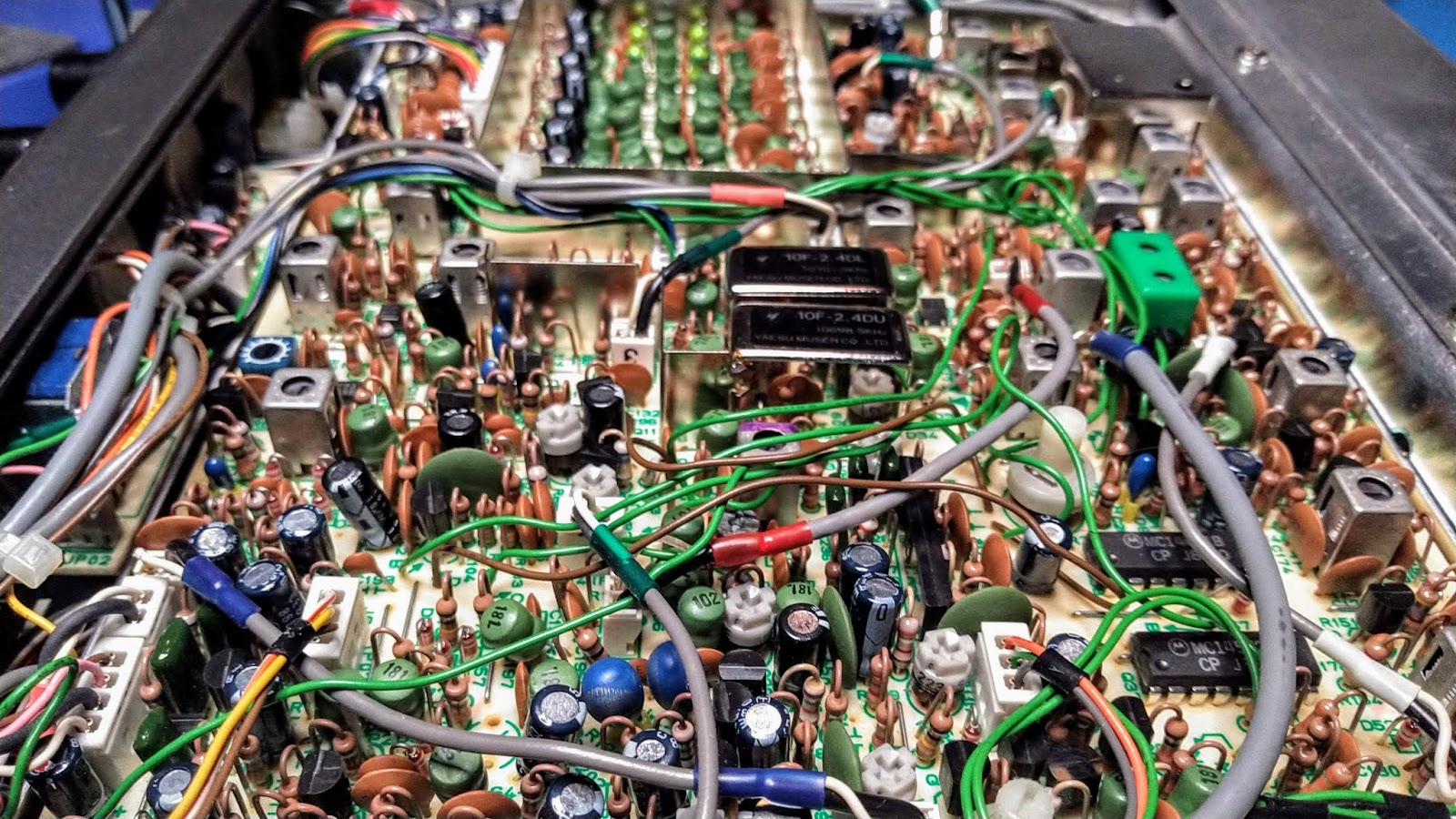


When I received the radio I opened it up to see what the insides looked like. Being a 30 year old radio I expected corrosion, maybe a few spider nests, etc. To my delight, the inside was a clean as the day it came off the assembly line in Japan. It's also an homage to the way radios used to be designed and built - hundreds of discreet components neatly stuffed on to boards and expertly soldered, with just a couple of early ICs thrown in to let you know what the future will look like. I was also relieved to see that the radio came with the LSB filter. Being a commercial/military design, most were USB-only. Yaesu included the socket for the LSB filter, but LSB was an extra-cost option. The USB & LSB filters are the two large rectangular cans in the center of the picture below:


The radio came with the external tuner, every bit as large as the radio itself. It's a great companion piece, but I think I'll end up just using my Elecraft T1:


Although the FT-70G came with a Yaesu-designed canvas backpack and has an SO-239 connector on the face of the radio (similar to the PRC-77), sadly it's not really designed for manpack use. It's more of a 'carry to the field location and set up in a semi-mobile configuration' rig. I don't know how robust the PA section is, so I'm not sure how SWR tolerant it is. Remember, this is an HF radio, not a VHF rig. Maybe I could find a 'closely resonant' 10 meter whip antenna to try, along with a conuterpoise. We'll see.

Once I get the radio back and spend some time with it on the air I'll do a more in-depth review of the entire FT-70G 'system', so stay tuned!

W8BYH out.