On 09 April, the Coastal Plains Amateur Radio Club in Southeast Georgia hosted a presentation by Craig Fugate, KK4INZ, titled 'The Importance of Ham Radio in Disasters'. The club subsequently posted the video of the meeting and made it available on YouTube.
I have to say, Mr. Fugate hit it out of the ballpark. He provided the best insight and guidance I've ever heard regarding disaster communications and Amateur Radio support. But Craig is no ordinary bubba with a radio who's been through a hurricane or two. Craig is in fact Mr. William Craig Fugate, former FEMA director under President Obama (2009 - 2017) and prior to that the Emergency Management Director for the State of Florida (2001 - 2009). Craig knows what he's talking about. Period. His bona-fides are unassailable. And his enthusiasm for Amateur Radio support during disasters is surprising, and encouraging. The video is long (about an hour) and it's mostly Craig speaking directly to the club members - no PowerPoint slides - so you have to listen. But listen closely, and take notes!
When I watched the video I came away with a full page of notes that I've distilled here:
Focus training on low probability/high consequence events - hurricanes, wildfires, earthquakes, etc.
ARES and AUXCOMM are not the same, and ARES still has a primary role at the local level
ARES #1 mission needs to be making sure the local EOC can talk to the state EOC. The #2 mission is making sure that the local EOC can talk to its subordinate fire & EMS stations and, by extension, it's local medical facilities (hospitals, critical care centers, etc.)
One of the first consequences of any disaster is that all commercial comms systems will be overloaded, particularly cell circuits. The cell sites may be up and functioning, but the demand will overwhelm them
All comms systems, regardless of how well they are hardened, have multiple points of failure. It's not uncommon for EVERYTHING to fail. In fact, it happens with alarming regularity
Any comms infrastructure reliant on IP - cell phones, VOIP, internet, etc. - is particularly vulnerable. Even commercial SATPHONEs at some point tie back to an IP-based ground system, and the connections will fail
AT&T's FirstNet is IP based and is not well hardened (he wasn't very complimentary of the whole FirstNet concept)
Supporting local shelters with communications really isn't all that important. Most of them will have all the comms they need
Focus developing digital mode expertise. Digital can carry more traffic, more accurately and under more adverse conditions, than voice
Repeaters will fail and 2 meter simplex will run into coverage issues very fast. Focus on HF
Most emergency managers at all levels have no idea what digital capabilities ARES can bring to the EOC. Some have heard of Winlink, few know what it really is or what its capabilities are. Almost none have heard of FT8, JS8, etc.
In a disaster, antennas are more vulnerable than radios. Have spares
Backup power - YES! Generators fail with alarming frequency
Risk. FEMA reimbursement rules don't cover privately owned radio gear if it gets damaged or destroyed while supporting a declared emergency. The point here is to push your local EMA to fund the necessary gear and have the ARES operators fall in on it
Craig's strong focus was on the use of HF for both local and long-haul communications - get the local EOC talking to state ASAP and don't rely on anything that has a high risk of failure (like repeaters). His perspective is interesting - he's seen too many commercial and government communications systems fail during real world disasters, particularly IP-based systems.
We can distill Craig's guidance down to one simple statement: EMAs at all levels need point-to-point communications systems that don't rely on any infrastructure. This is the key role that ARES is best suited to fill at the local and state levels, and that needs to be our primary mission and training focus.
I consider this presentation, the lessons learned it discusses and the advice it provides, to be a critical guide to future ARES and AUXCOMM mission definition and training. Craig's advice is both invaluable and unassailable. If there was a way I could force every local and state emergency manager to sit down and watch this video and absorb the lessons, I would.
And many times listening is more important than talking...
Yesterday Thomas Witherspoon's excellent SWLing Post blog offered a guest post by Jock Elliott, a frequent contributor. In this post, Jock details how is father, a WWII Canadian Royal Air Force lieutenant, was shot down over Germany and his status (dead/alive, prisoner/in friendly hands) was unknown.
Then, as if by a miracle, letters and postcards from complete strangers started to arrive, notifying Mrs. Elliott that a German shortwave broadcast had announced that her husband was alive and a 'guest' of the German government.
This was not an unusual occurrence. In early 1942 the US Government shut down all Amateur Radio transmitting activities. You know, spies and all that. Most Amateur Radio operators of draft age were quickly sucked into one of the services; if you could copy and send CW at 15 wpm or better, you had a golden ticket to a communications assignment. Older operators were ordered to pull their transmitters off-line. But unlike WWI, where the US Navy (which controlled wireless activity at the time) would actually come to your house and seize your gear and yank down your antennas, in 1941 operators were just told to go QRT, and everyone complied.
But nobody said you couldn't listen! Across the United States, and particularly along the northeastern seaboard, Amateur Radio operators and regular citizens routinely listened in on German commercial, government and military transmissions. There were formal and informal monitoring nets that listened faithfully to German broadcasts like the one discussed in Jock's post, in an effort to collect the names and service numbers of POWs. As brutal as the Nazi regime was, they were actually fairly responsible about reporting Allied POW information to the International Red Cross, and then broadcasting lists of POWs during their commercial shortwave broadcasts.
I'm guessing thousands of Allied POWs had their 'guest' status confirmed by shortwave broadcast. This information was a godsend to many families, who had no idea if their loved one was dead or alive.
The story of radio in WWII is incredibly rich. Radio didn't just inform, it was a true weapon of war. Both sides in the European Theater used radio skillfully, from broadcasting propaganda, to intercepting clandestine communications, to providing deceptive cover for battlefield operations, to pinpointing attacking aircraft and submarines, to communicating with spies and resistance groups.
And, as in this case, providing comfort and hope to an anxious family.
I come from an age when opening up and upgrading or maintaining your computer wasn't just a fun hobby, it was a necessity. Almost a survival skill for anyone in a tech related field. I clearly remember the day our Army unit received its first shipment of Heath/Zenith PC clones (very good PCs, by the way). The first thing we did was pull out the screwdrivers to have a look inside and pass judgement on the system capabilities. By the end of the day we were sticking third party VGA boards, modems, storage expansion cards and more into the expansion slots to test out compatibility and expandability. That was the norm. Even early generation laptops were designed and built to be tinkered with - adding RAM, swapping out batteries, etc. It was possible to keep a computer running and relevant well past its expected service life by doing simple component upgrades.
Then came the era of the fully sealed laptop. I think I blame Apple for this. Starting in the 2010s the laptop market swiftly moved to what were little more than hermetically sealed disposable pieces of plastic (or for a bit more cash, hermetically sealed disposable pieces of aluminum). While you could usually open up these devices (with no small amount of fear-inducing prying) they were not really designed to be serviced or upgraded by the owner. Then manufacturers like Microsoft took it whole other level and began producing high end devices that couldn't be opened for repair or upgrade by any means, EVEN BY MICROSOFT. The classic examples of this are the Surface Pro tablets, high end devices with notoriously bad batteries.
SurfacePro 7. Great device, expensive, and unrepairable
Customers were paying MacBook Pro-level prices for SurfacePros and having the batteries crap out in about a year ('crap out' as in not being able to hold enough of a charge to power the tablet for more than an hour or two). If you had bought Microsoft's extended warranty you were ok - send it off to Redlands and Microsoft would ship you a new one. If you hadn't bought the extended warranty you were out of luck. Not even Microsoft could repair it. Their only advice was to buy a new model which, like the old model, was not repairable. This problem persisted right up through the SurfacePro 7, and may plague later models. Now, I pick on SurfacePros because I use them as my 'daily drivers'; my work laptop is a SurfacePro 7 and in my office I've supported the entire line of SurfacePros from the 3 through the 7 series, and a smaller smattering of SurfaceGo tablets. I actually like the SurfacePros, I really do. They are outstanding devices that bring a true laptop experience to a tablet format. But I'd never pay for one out of my own pocket. Why would I sink that kind of money into a device that can't be repaired or upgraded?
Which is why this video caught my attention:
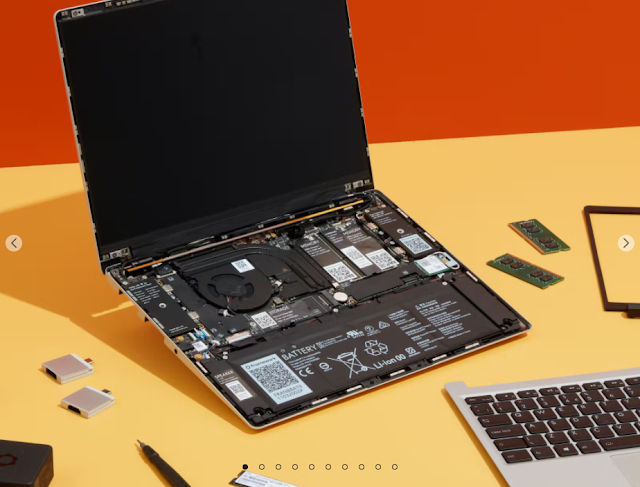
I remember hearing about the Framework laptop initiative over a year ago, when there was a lot of discussion swirling around tech forums on the web about the relative unrepairability of most consumer laptops. At the time Framework was just a concept looking for crowd source funding, but now it looks like the whole thing has become a reality.
Watching the video I have to say that I love both the design and the execution. It's unlikely that Framework's laptops will win any awards in the gaming community, but for every day business-class computing, it's a winner. The design tackles a number of issues I've faced when managing hardware in an enterprise environment. Think of this fairly common situation. Both John and Sally need laptops. Sally needs one that has an HDMI port and USB C. John doesn't need HDMI or USB C, but does need a laptop with an SD card reader, two USB A ports and 1 TB of storage. Company IT will only provide laptops that have one USB C port and an SD card reader, and 500 GB of storage. Neither John or Sally are happy. With the Framework concept, IT can provide the bare-bones laptop and a stack of add-on modules that allow both John and Sally to configure their computers to meet their specific needs. And if something does break or wear out, like the battery goes dead or the keyboard goes bad, local IT can handle the fairly simple repairs in-house, without having to farm out the work or deal with warranty swaps of whole units. Turn-around time for repairs can be measured in hours, not days or weeks.
Modularity is one of the main reasons I'm fascinated by things like Panasonic Toughbooks and their Dell equivalents. These laptops are not just rugged, they are modular in design and are fairly easy to open up and modify. The Framework laptops certainly are not as rugged as a Toughbook, but as the video shows, they are well built. Even better, their modularity handily beats what we get with a Toughbook. Plus the Framework price is a whole lot less than a new Toughbook. Thousands less.
Ham radio guys and gals are a tinkering bunch. Its the nature of the hobby. Who else would order a bag of circuit boards and thru-hole components and spend a couple of days soldering up a gizmo, and call it fun? I know ham radio operators that have multiple 20 year old computers running in their shacks for no other reason than, if something goes wrong with one of them, they can tear it apart and fix it. What hams don't like is something that, by design, can't be repaired. That violates the ham radio secret codex that says "it must be able to be pulled apart and reassembled and still work".
While the cheapest Framework laptop may be too pricey for many hams, it could actually be a cheaper alternative if the cost is extended across its useful life. Issues that cripple a hermetically sealed laptop - a bad battery, a USB port that stops working, dead keys on a keyboard, etc. - are simple and easy component swaps. Of course this all assumes that Framework remains a viable business all the way through the useable lifespan of the laptop, and that's the great unknown at this point. What happens if you buy a Framework laptop today, and the company disappears next year? This is why I'd love for a major player in the laptop world, like Dell or HP, to take this same approach to modularity and reparability. But I realize there's no chance either company would adopt a Framework philosophy; it's just not in their corporate DNA. Their business model is to sell in volume to repeat customers who need new laptops every few years. Selling them a competitively priced modular laptop that has a useful life beyond five years AND is cheap and easy to repair or upgrade isn't going to happen. Which is why I think Framework actually has a chance of surviving, and even thriving, in this niche market. There are plenty of laptop users like me who are tired of having to deal with unrepairable systems and want the ability to easily fix vs. replace. I may not be able to break my employer's addiction to Dell products, but in my personal life I can make that choice.
In past posts I've hinted that I'm not afraid to get into the gust of certain radios to do what is referred to as the 'Mars mod'; open the radio up for wide band transmit for use on MARS and SHARES frequencies. To date I've done it on two Icom IC-7100's, two Yaesu FT-891s and, before I got adventurous with a soldering iron, paid to have it done on an Icom IC-7200, a 7300 and a Yaesu FT-991A.
A week ago, as part of my pure fleet initiative, I bought a used IC-7300 from a seller on QRZ.com. I've been haunting various ham radio equipment sale and swap sites for a while now, looking for a good deal on a used 7300, so when this one popped up I grabbed it. Even before I had it in-hand, I was thinking about doing the MARS mod myself. The modification procedures for many HF rigs are available on the internet, and for modern Icom radios it usually means removing a diode from the main board to open up the transmit stage (opening up the receive side is usually not necessary). In the past I used a soldering iron to loosen the solder holding the surface mount diode to the board, and that's a worrisome mix of shaky hands, teeny-tiny closely packed components and a hot soldering iron. But as I was discussing this process a few days ago with my good friend Ken, AI4UW, he asked two key questions: Do you intend to ever re-install the diode? Is the diode in a location you can get to it with a pair of miniature side-cutters? No to the first, yes to the second. Well, he said, just go in with a small set of side cutters and snip it off the board. Just make damned sure you snip the right diode! Ken does high level aviation electronic system repair for Delta Airlines. If you fly Delta into or out of Atlanta, odds are good that Ken has worked on an electronics system on that plane. He knows what he's talking about, so I decided to follow his advice and go the 'snip' route.
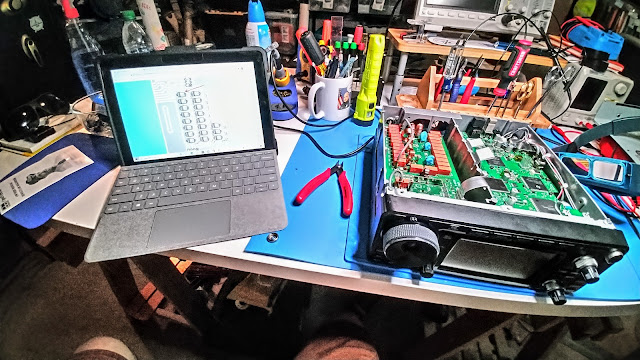
The diode we're after is on the underside of the main board, so we have to remove the bottom cover
We're after diode D422, and ONLY D422
It's important to have your references at-hand when doing this work. The last thing you want to do is remove the wrong component
You're gonna' need magnification. Lots of it.
It was hard to get the camera to focus, but the diode is about where the arrow is pointing
Again, poor focus, but you can see the pad for the diode after it was removed by snipping it out
Glamour shot! Here's a wider view of the radio from the bottom, looking at the underside of the main board and the build-in tuner. The IC-7300 is actually a very beefy radio
I have to say, it was a very simple process, and a lot easier and a lot less anxiety-invoking that trying to remove the diode with a soldering iron. The shears I used were the Crescent miniature wire cutters available from Amazon, Home Depot or Lowes. Because the cutters are angled and ground flat, they can also act as side-cutters, which allows you to get flat to the circuit board when performing this operation.
Easy and simple process, yes. But did it work? Have a look:
This gives me two identical high performance HF rigs that can be used across all the Amateur, MARS and SHARES frequencies, and allows me to dedicate a rig for each role. If one fails, the working radio can be easily and quickly re-configured to take over the job of the other. It's a simple configuration file upload from an SD card. I'm happy.
Last night (31 March), my good friend Joe Domaleski, KI4ASK, gave an excellent presentation to our local club, KK4GQ, on APRS.
Every once in a while I have to be re-reminded about how useful APRS can be. I simply don't spend enough time fooling around with it to develop any level of proficiency beyond beaconing my location. APRS, like Winlink, can be used as a two-way communications tool between ham radio operators and non-hams, using some of the neat APRS-to-SMS or APRS-to-email tools that have been developed.
Looks like I'm going to have to invest more time in figuring all this out. Joe, I don't know whether to thank you, or curse you 😄
One of the key issues with the new(ish) Icom IC-705 is that it's designed to be a field /portable radio, yet it's also easily subjected to knocks and bangs in the field. I'm not saying it's a fragile little thing - it's essentially a magnesium 'bucket' inside a tough plastic shell, and all the board mounted components are neatly stacked inside the 'bucket' and are well protected. But the front panel, including the touch sensitive display, is not protected at all. Plus... it's a $1,400 radio, and even if it were made out of ballistic Kevlar it still deserves some protection from rough handling.
But protecting the 705 is a bit of a challenge. We can't simply wrap the radio in another hardened shell, for two reasons. First, the radio relies on ambient cooling. It has no fans or fins. The radio is a cool runner, even on digital modes, but wrapping it up in another enclosure could introduce a heat problem. Next, the radio has a built-in GPS, and the GPS patch antenna can be easily blocked by things outside the rig, like boxes, cases or cages.
For months I've been singing the praises of the Windcamp Ark-705 cage. It's a well designed and built aluminum cage that offers very good protection for the 705. However, it has a serious design flaw - the metal of the top portion of the cage blocks the GPS antenna. I'm not sure just where the GPS antenna sits inside the IC-705, but I have to guess that at the top of the case - that's the only location that makes sense. I've watched the only IC-705 tear-down video available on YouTube several times, but just can't figure out precisely where the GPS antenna is*. Regardless, my testing shows that the Windcamp cage does block GPS signals. Not completely - if you set the radio outdoors beneath an open sky it will eventually achieve GPS lock, but it takes a lot longer than if the radio is sitting 'nekkid'
Ark-705 case. Nicely made, but looks like it interferes with GPS reception
This discovery caused me to take another look at the Peovi 705 cage. The Peovi 'cage' as originally designed is really just a mounting frame and offers no protection to the rear of the radio. It is well designed and executed, but it falls short of offering any real protection to the radio. I was an early customer of Peovi, buying one fairly soon after they were introduced, but became disenchanted with the lack of protection it offered. It's at this point that I turned to the Windcamp.
The original Peovi cage looks good from the front, but...
Doesn't offer any protection for the rear of the rig
But recently, and without any fanfare, Peovi released an add-on for their original cage that ads a bit more wrap-around protection. I first caught hints of it on one of the IC-705 Facebook pages. Called the Full Wrap Protection Add-On Kit, it doesn't really 'wrap around' the radio, but it does offer some bump protection. As they say on late night TV infomercials, "but wait, there's more!". In cooperation with Peovi, Gemsproducts, the company that makes the highly regarded Side KX polycarbonate snap-on covers for the Elecraft KX line of radios, developed a similar cover that fits into the Peovi carry handles and fully protects the front of the radio. The new Peovi add-on protection kit and the Side KX snap-on cover caught my attention and drew me back to the Peovi solution.
Peovi 'full wrap' add-on kit
Side KX snap-on cover
I bit the $$$ bullet (add up the pricing for all the components and you'll understand why I use the term 'bit the $$$ bullet') and ordered the full wrap kit and the Side KX cover. They came in a few days ago and I assembled everything and did some testing. I have to say this - the Peovi full wrap kit is very elegantly machined; it's almost a work of art. It offers somewhat less protection to the top and rear of the radio, but as we'll see in a minute that's actually a plus. The Side KX polycarbonate cover is tough - tough to snap in, tough to snap out, and tough enough that I'm convinced you could drop the rig on its face and the cover would fully protect it. You could probably beat the cover with a baseball bat and it would just laugh at you. It's that tough.
Included with the wrap kit is what looks like a carry handle, but it's actually intended for use as a tilt stand or bale. It works quite well - folds away when not in use, swings out to prop the rig up at an ideal viewing angle when in use.
*So what about GPS reception? Well, while writing this post I was also holding a running conversation on the GPS antenna question with 705 owners over on the IC-705 Groups.io email reflector. Apparently full schematics for this radio have not leaked out (yet), but a few folks commented that the GPS antenna is part of the control head unit (along with the display panel, VFO knob control buttons, etc.). The GPS receiver is integrated into the front panel circuit board, and the antenna is snugged up into a small space between the speaker and Multi knob. If you watch the linked Japanese CQ teardown video and freeze it at the 2:04 mark you'll see the back of the control head showing the circuit board and the antenna (circled below):
One of the benefits of the Peovi cage seems to be that it interferes less with GPS reception. With the Windcamp cage the 705 rarely established GPS lock indoors, even when near a window. Outdoors the radio, still in the Windcamp cage, would establish a lock but it took several minutes and was easy to lose if you moved the radio. With the Peovi cage, the 705 quickly establishes GPS lock indoors or out, and holds that lock better when the radio is moved around outdoors. If you compare the Windcamp and Peovi cages in the area where the antenna is located there's not a whole lot of difference in the amount of metal. But the difference is just enough - the little extra metal in the Windcamp cage definitely interferes with reception.
So going forward I'll be using and testing the Peovi cage, and I'll report back time-to-time. Stay tuned!
Is it a dry spell, or am I just too busy? I honestly don't know for sure. Probably a bit of both. Sometimes you can get tired of writing and just need to turn your brain off for a bit. But I do have to say, on review, I do have a lot of little radio projects going on.
DSTAR. I mentioned in January that our local DSTAR repeater is still operating, but has been disconnected from the internet. It was a business decision our club made after we lost use of a cheap Sprint hotspot for the wi-fi connection. The repeater will be back on the internet later this year, but until then if club members want to work the DSTAR reflectors they'll have to do it through a hotspot. Which is why I bought one. The ZUMSpot USB dongle finally arrived from HRO. I'm using PA7LIM's BlueDV application on my laptop to control the little gizmo, and I've got both my ID-51 and my ID-5100 mobile set up to talk through it. I gotta' say, it works pretty neat! I never really 'got' the need for a digital mode hotspot until recently, but I actually feel a bit better having one vs. having to rely on the local repeater. One more tool in the hurricane season toolbag!
Speaking of computers (were we?), my Winter Field Day experience, and the difficulty managing the Trimble T-10 (lousy keyboard, no backlit keys, doesn't stand on its own, not enough USB ports) has me re-engaging with my Dell 5414 ruggedized laptop. This means upgrading all the applications (like Winlink), adding new apps like BlueDV, transferring data over from the Trimble, etc. We'll see how it goes. I still like the Trimble - a LOT of capability in a small, exceptionally rugged package, but until I can come up with a better keyboard and stand solution I'll be using the Dell.
For the past few weeks I had been wondering why the ID-5100 in my shack was having difficulty getting a good signal into our local repeater (KK4GQ - 145.210). A few days ago I walked around the side of the house and found out why. The antenna was laying on the ground under an inch or two of leaf litter. Hmmm... maybe that had something to do with it? 😒 The antenna is an Ed Fong DBJ-1 that was hanging from a convenient tree limb. The tree limb decided it was time to give up the ghost, and down came the antenna. That I could hit the repeater at all is one heck of a testament to Ed's design. So on Sunday I went back out with my slingshot and put a line up over another, higher limb and the antenna is back up. The SWR is a touch higher that I'd like - about 1.8 on the repeater frequency, but for now I'm happy.
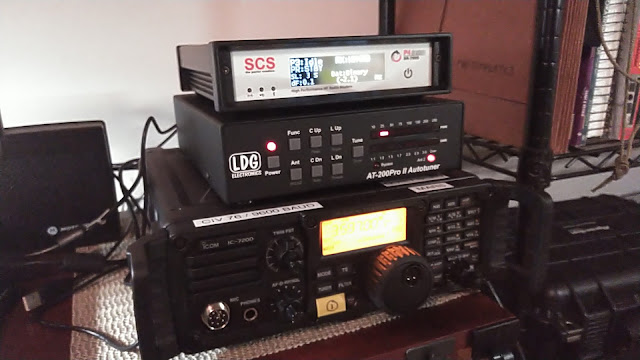
A few weeks ago a rare unicorn came up for sale on eBay at a very reasonable 'buy it now' price - an SCS 7800 P4Dragon Pactor modem. The seller wasn't giving it away - he knew what he had - but his asking price was about $500 below what a similarly configured new modem would cost. He was the original owner and was willing to chat about how he came into the modem and why he was selling it, and he assured me it was in like-new condition. That increased my sense of comfort that this was a good deal, so I took the leap and now find myself the owner of a shiny, nearly-new Pactor modem. I used a borrowed 7800 several months ago to test the new SCS ALE2 firmware, so I had a good base of experience with the modem and how it interfaces with Winlink (very nicely , thank you). I've got it set up with my IC-7200 'FrankenRig' (MARS mod, quiet scan mod) for testing.
The modem works like a champ on Winlink, but I'm still working through some configuration issues on ALE. I'll have more on this topic in a later post.
Speaking of ALE, Devin Butterfield, the developer of the Ion2G ALE application released version 0.9.7.8 this week. This release introduced a number of neat improvements and upgrades. I've said this before - Ion2G is hands down the best software-based ALE application available, and may even be better than the hardware based implementations in devices like the SCS modems (above). I've personally run Ion2G, the SCS ALE application and MARS-ALE (a derivative of PC-ALE). Ion2G is by far the easiest to get up and running, and offers the best support (via the Groups.io reflector). If you have an interest in ALE, there is no reason to not try Ion2G.